Table of contents
Short answer: recent iPhones, Galaxy phones and Pixels can translate calls built in. On any other phone, a phone call translator app does the same job.
Quick answer
Three phone lines translate calls without an extra app in 2026:
- iPhone 15 Pro and later (Apple Intelligence, iOS 26 or later): Live Translation in the Phone app.
- Samsung Galaxy phones with Galaxy AI (One UI 6.1 or later on supported models): Live Translate in Call assist.
- Google Pixel 10 and later: Voice Translate in the Phone app.
Each one covers a limited list of languages, and the other person answers a normal call on any phone. If your phone isn't on the list, or your language pair isn't covered, use a call translator app such as AI Call, which works on iPhone and Android and dials any mobile, landline or VoIP number.
The list: phones with built-in call translation
| Phone | Feature | Models | Languages (maker's figure) | The other person |
|---|---|---|---|---|
| iPhone | Live Translation (Phone app) | iPhone 15 Pro and later with Apple Intelligence, iOS 26+ | About 10, including English, Spanish, French, German, Portuguese, Italian, Chinese, Japanese and Korean | Any phone; one-to-one calls |
| Samsung Galaxy | Live Translate (Call assist) | Galaxy S22 and later, Z Fold4/Flip4 and later, on One UI 6.1+ | 22 (as of 2026) | Any phone |
| Google Pixel | Voice Translate | Pixel 10 and later, including Fold; Pixel 10a with fewer languages | English with 10 others: French, German, Hindi, Indonesian, Italian, Japanese, Portuguese, Russian, Spanish, Swedish | Any phone; both sides hear a short announcement |
| Any iPhone or Android | A call translator app, such as AI Call | iPhone and Android | 100+ | Any phone; nothing to install |
Language lists and supported models change with software updates and differ by region. Check the maker's page for your phone before you count on it.
iPhone: Live Translation in the Phone app
On an iPhone that supports Apple Intelligence (iPhone 15 Pro and later) running iOS 26 or later, you can turn on Live Translation during a one-to-one call. You download both languages first. Your words are translated and spoken to the other person, and their replies are translated for you, with a transcript on screen.
- Good: built into the dialer, no extra cost, the other person can use any phone.
- Watch out for: older iPhones aren't supported; the language list is shorter than dedicated apps; group calls aren't covered.
- Steps and limits: see Does iPhone translate phone calls? and Apple's instructions.
Samsung Galaxy: Live Translate in Call assist
Galaxy phones with Galaxy AI translate calls through Call assist → Live translate. Samsung lists support on the Galaxy S22, S23, S24 and later series and on the Z Fold4, Z Flip4 and later foldables, running One UI 6.1 or later, and 22 languages as of 2026. Some languages need a downloaded language pack, and Samsung says only one person on the call should turn it on. It also works in some third-party calling apps.
- Good: the widest built-in language list; works on foldables.
- Watch out for: only on supported Galaxy models; check that your pair is in the list.
- More: Samsung Live Translate compared and Samsung's guide.
Google Pixel: Voice Translate
On Pixel 10 and later, including the Fold, Voice Translate translates calls between English and French, German, Hindi, Indonesian, Italian, Japanese, Portuguese, Russian, Spanish or Swedish. It runs on the phone, works without an internet connection, and the translated voice sounds like yours. Both people hear a short announcement before translation starts. Pixel 10a supports fewer languages.
- Good: on-device and private; natural-sounding voice.
- Watch out for: one side of the call has to speak English; older Pixels aren't supported.
- More: Google's help page.
Any other phone: use a call translator app
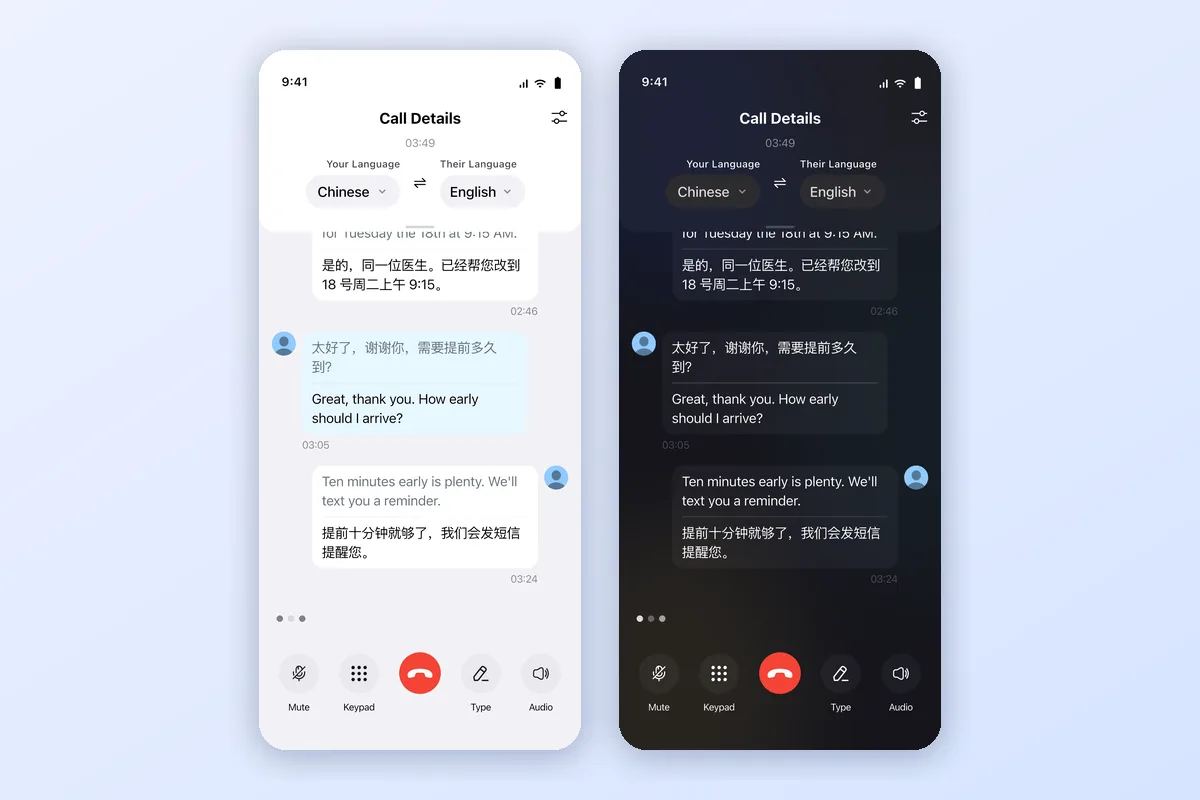
If your phone isn't on the lists above, or your language pair isn't covered, a call translator app does the same job on almost any recent iPhone or Android phone. AI Call dials regular mobile, landline and VoIP numbers and translates both sides as you talk. The person you call answers a normal call and needs no app, and you see a bilingual transcript on screen.

It also helps when the built-in feature is there but doesn't fit: you need a language outside the list, you switch between iPhone and Android, or you also want video calls and Call Links. For other apps, see our top 6 phone call translators.
How to choose
| Your situation | Use |
|---|---|
| iPhone 15 Pro or later, and both languages are on Apple's list | Live Translation in the Phone app |
| Recent Galaxy phone, and both languages are on Samsung's list | Live Translate in Call assist |
| Pixel 10 or later, and one side speaks English | Voice Translate |
| Older or budget phone, or a language outside these lists | A call translator app such as AI Call |
| Court, immigration or serious medical calls | A qualified human interpreter |
How real-time call translation works on a phone
Every option follows the same loop: the phone recognizes what you say, translates it, and speaks the translation to the other person, then does the same in reverse. Built-in features do this on the phone or with the maker's AI. Apps like AI Call place the call through their own calling service, which is why they work on more phones and language pairs. In all cases, speak in short sentences, pause for the translation, and repeat names, numbers and dates.
Is it free?
The built-in features cost nothing beyond your normal call. AI Call is free to download, and new users get one free translated call of up to 2 minutes to try it (to phone numbers in the US, Canada, or the UK). After that, calls use credits from a subscription or credit pack bought in the app; prices depend on your plan, app store, and country.
👉 Get AI Call: App Store (iPhone) · Google Play (Android)
Frequently asked questions
Which phones can translate calls in real time?
In 2026, three phone lines translate calls built in: iPhone 15 Pro and later with Apple Intelligence (Live Translation in the Phone app), recent Samsung Galaxy phones with Galaxy AI (Live Translate in Call assist), and Google Pixel 10 and later (Voice Translate). On any other iPhone or Android phone, a call translator app such as AI Call translates calls to regular numbers.
Does the other person need the same phone?
No. With the built-in features and with AI Call, the other person answers a normal call on any phone. Translation runs on your side.
Which built-in option supports the most languages?
Samsung lists 22 languages for Call assist as of 2026. iPhone Live Translation in the Phone app covers about ten languages, and Pixel Voice Translate pairs English with ten others. Dedicated apps such as AI Call cover more languages and work across phone brands.
Can I translate calls on an older iPhone or a budget Android phone?
Not with the built-in features, which need recent models. Use a call translator app instead: AI Call works on iPhone and Android, dials any mobile, landline or VoIP number, and the person you call needs no app.
Is AI Call free? How much can I use for free?
AI Call is free to download, and new users get one free translated call of up to 2 minutes to try it (to phone numbers in the US, Canada, or the UK). After that, calls use credits from a subscription or credit pack bought in the app; prices depend on your plan, app store, and country.
Try AI Call for free
Call anyone in any language. Your first translated call is free (up to 2 min).
