Primary page for this search intent
Looking for a tool to translate live calls to real phone numbers? Go to Phone Call Translator.
Table of contents
New to AI translation? Learn what an AI translator is — definition, types, and how phone call translators fit in.
Looking for a full comparison? For the complete breakdown of all dedicated phone call translator apps — including EzDubs alternatives, Lingvanex, and Telelingo — see our full guide: Best dedicated phone call translator apps.
Quick answer: AI Call by TaraAI LLC translates both sides of a live call to a regular mobile, landline, or VoIP number. The caller uses AI Call on iPhone or Android; the recipient answers normally without installing an app. Free download does not mean unlimited free calls: check available minutes, supported destinations, and current charges in the app.
This comparison is published by AI Call, not an independent testing organization. AI Call (1aicall.com; iOS App Store ID 6744344005) is a different product from the similarly named AI Phone. The recommendations below are based on calling workflows, not a measured speed ranking.
Choose the right mode:
- Phone calls: Dial a regular number; only the caller needs AI Call.
- Voice and video: Call an AI Call contact, or share a Call Link so a guest can join a separate internet call in a browser. A link shared in WhatsApp does not translate an existing WhatsApp call.
- Text chat: Both people install AI Call and exchange translated written messages inside the app. Call Links do not provide this text-chat workflow.
- SMS: AI SMS is a separate feature using a US or Canadian number.
Top picks at a glance
- Best overall: AI Call — real mobile, landline, and VoIP numbers; 100+ languages; no app on the other side for regular calls
- Free download to try: AI Call — check current trial minutes and charges on iOS and Android
- Best for in-person only: Google Translate Conversation mode — not for live phone calls
For the full product guide, see phone call translator. For all dedicated apps side-by-side, see best dedicated phone call translator apps.
What makes a phone call translator app different?
Not all translation apps are designed for phone calls. Most translation tools — including Google Translate — are built for text, camera, or face-to-face conversation. A real phone call translator app has to solve a harder problem: translating two speakers in real time over a phone connection, where audio quality varies and translation delay depends on the connection, language pair, and speech.
The key features to look for:
- Real-time translation — The app should translate as you speak, not after you finish a sentence
- No setup required on the other end — The person you call should receive a normal phone call
- High language coverage — At least 50+ languages for most use cases, 100+ for international use
- Low latency — Test your language pair and connection; take turns speaking and confirm important details
Top phone call translator apps in 2026
Here is a quick side-by-side of the main free phone call translator options before the details:
| App | Real phone calls | Video calls | Languages | Other person needs app |
|---|---|---|---|---|
| AI Call | Yes, supported destinations | Yes, over the internet | 100+ | No for regular phone calls; optional for video via Call Link |
| Google Translate | Not a phone dialer | Not a video calling service | Varies by mode | A shared device can be used face-to-face |
| Microsoft Translator | No | Limited | 70+ | Yes |
| iTranslate Converse | No | No | 40+ | Yes |
| iOS Live Translation | Yes, on supported devices and languages | FaceTime translation on supported devices | Check current Apple availability | No for a regular phone call |
| EzDubs | Acquired by Cisco; current consumer availability not verified here | Not verified | Not verified | Not verified |
2026 note: Built-in translation has device, software, language, and regional requirements; check Apple’s current phone translation instructions. Cisco confirmed its acquisition of EzDubs; that announcement alone does not establish a consumer shutdown date. For AI Call, check the current app listing, destination, languages, and plan before calling.
1. AI Call — Best overall
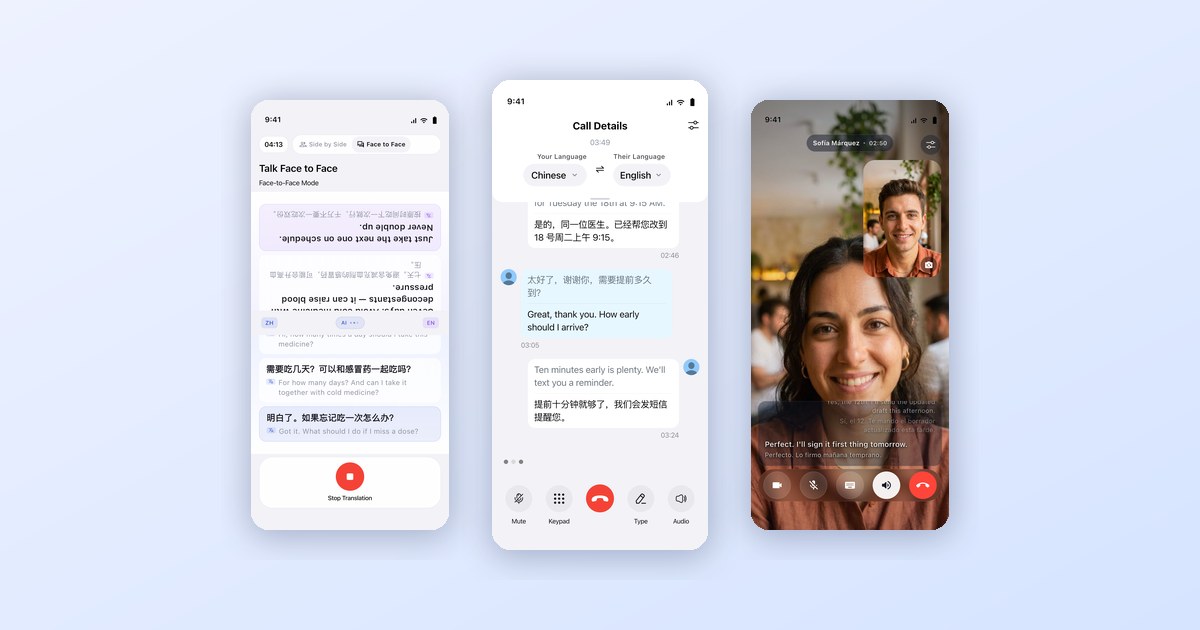
AI Call combines several communication modes: outbound phone calls to supported numbers, face-to-face translation, HD voice and video calls between users with live subtitles, two-way translated messaging via AI SMS, and an autonomous AI agent that makes calls on your behalf. All of it is free to download.
What makes it stand out:
- The other person needs no app for phone calls — they receive a normal call in their language
- Translates both sides during the call; timing varies with connection and speech
- Face-to-face mode for in-person conversations without typing
- Voice & video calls with live translated subtitles for both sides
- AI SMS: get a real phone number; every message auto-translated
- AI Agent: describe a goal, the AI places the call and handles it
- Supports 100+ languages
- Free to download on iOS and Android; check current trial minutes and charges
Best for: Anyone who needs to communicate across languages, whether by phone, video, message, or in person.
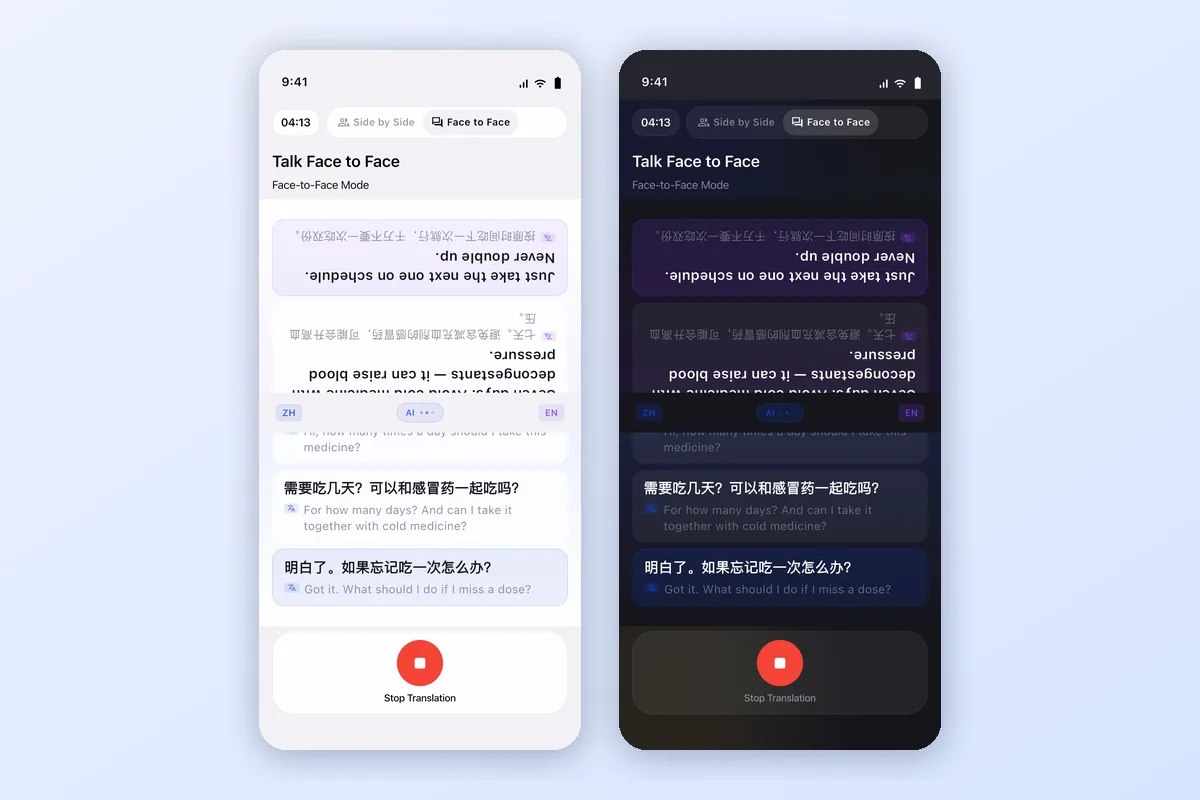
Face-to-Face mode flips the top half of the screen so the other person can read their language while you both talk.
| Feature | AI Call |
|---|---|
| Outbound phone calls | Supported mobile, landline, and VoIP destinations |
| Face-to-face translation | Yes |
| Voice & video with live subtitles | Yes |
| Translated messaging (AI SMS) | Yes |
| AI Agent mode | Yes |
| Other person needs app | No for regular phone calls; yes for in-app text chat; browser joining available for Call Links |
| Languages | 100+ |
| Latency | Varies with connection, language pair, and speech |
| Free | Free download; check minutes, limits, and charges in the app |
| Platforms | iOS, Android |
Watch AI Call place a real phone call and translate both sides of the conversation live.
2. Google Translate (Conversation mode)
Google Translate includes a Conversation mode that can translate back-and-forth speech between two people. For face-to-face use, two people can share a device. Google Translate is distinct from Pixel phone-call translation; its conversation mode is not a dialer for calling a regular phone number.
Best for: In-person conversations with someone standing next to you.
3. iTranslate Converse
iTranslate Converse is a voice translation app with a push-to-talk interface. Like Google Translate Conversation mode, it requires both speakers to use the same app and is better suited for in-person use than live phone calls.
Best for: Face-to-face conversations when both parties can share a device.
4. Microsoft Translator
Microsoft Translator supports real-time group conversation translation via a shared session. Multiple people can join a conversation from their own devices. It works well for meetings where everyone has a smartphone, but does not translate standard outgoing phone calls to numbers.
Best for: Multilingual team meetings where everyone can join the same digital session.
How AI Call Translates Phone Calls
Translating a live phone call with AI Call takes just a few taps. Here is how to translate phone calls step by step:
- Open AI Call on your iPhone or Android phone
- Select your language
- Select the other person's language
- Dial a supported mobile, landline, or VoIP number with its country code
- Speak naturally while AI translates both sides of the call in real time
The person you call answers a normal phone call and hears your words in their own language — no app, link, or setup required on their end.
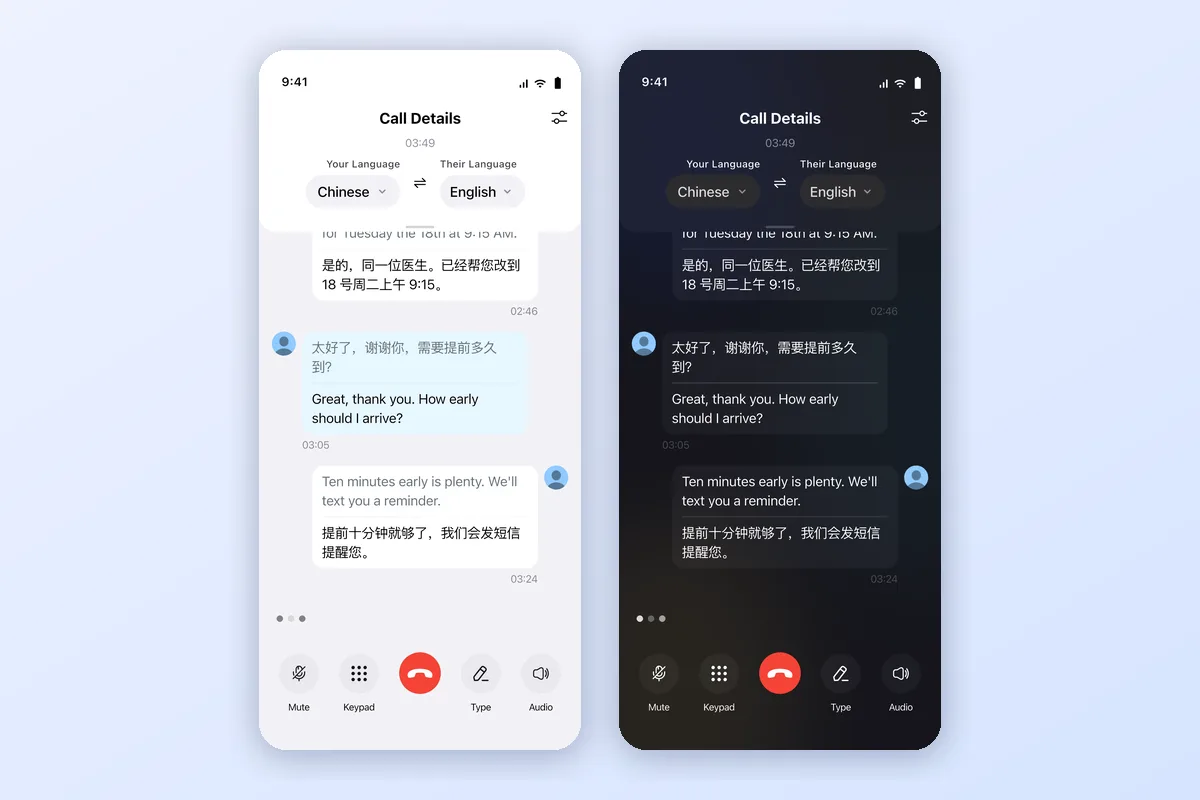
A real translated call in AI Call: both sides of the conversation appear in Chinese and English as you speak, with mute, keypad, and type-to-talk controls.
The same real-time translation works on voice and video calls between AI Call users, with live subtitles for both sides.
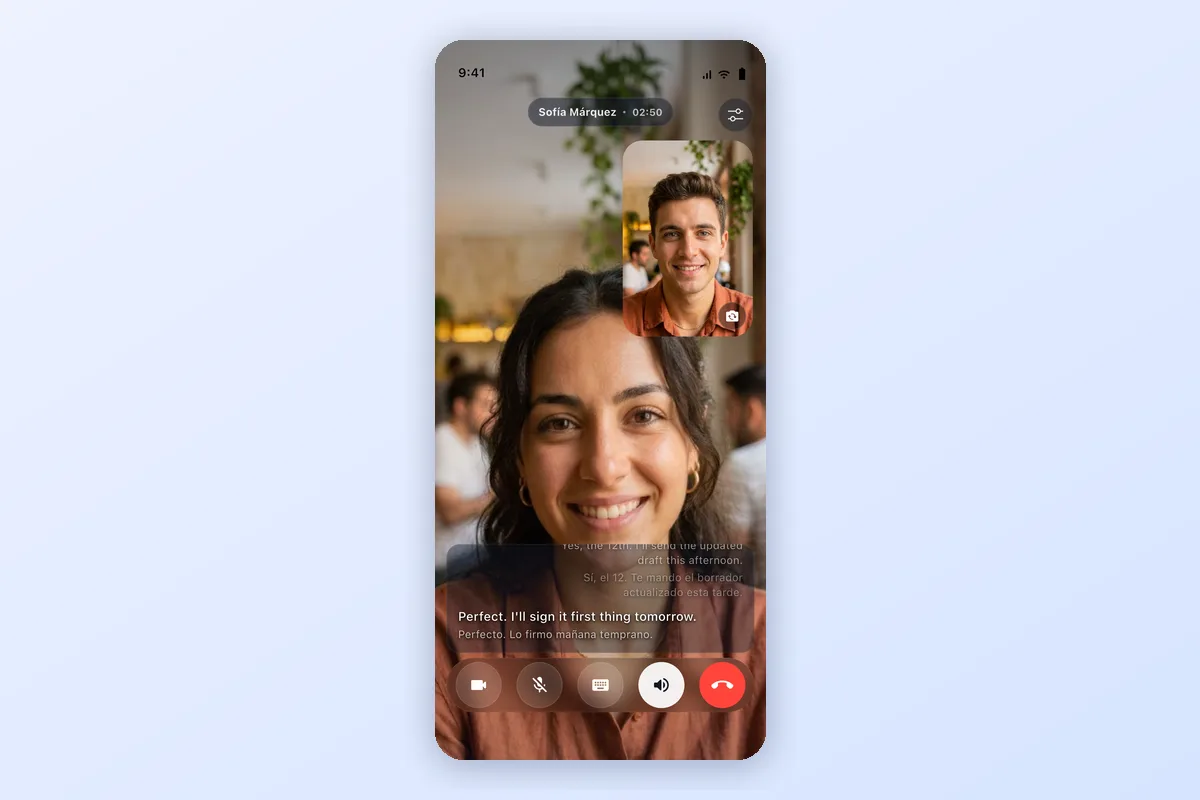
Video calls get the same treatment: live subtitles for both speakers, translated in real time.
AI Call vs Google Translate, DeepL, and ChatGPT Voice
The quick-compare table near the top covers free phone call translator apps. This deeper comparison looks at how AI Call stacks up against the general translation tools people most often try for calls:
| Feature | AI Call | Google Translate | DeepL | ChatGPT Voice |
|---|---|---|---|---|
| Real phone calls | Yes | No | No | No |
| Dials real phone numbers | Yes | No | No | No |
| Live two-way translation | Yes | Limited | Limited | Limited |
| Incoming call support | Yes | No | No | No |
| Video calls | Yes | No | No | Limited |
Google Translate, DeepL, and ChatGPT Voice are strong general translation tools, but none of them connect to the phone network or dial a real number. AI Call is built specifically for live calls.
Why Google Translate Cannot Translate Real Phone Calls
Google Translate is excellent for text, signs, and in-person conversation, but it is not a phone call translator. Here is why it cannot translate a real phone call:
- It is not connected to the phone network, so it cannot place or receive calls
- It cannot dial real mobile, landline, or VoIP numbers
- For face-to-face Conversation mode, both people can share one device
- It has no incoming-call support for foreign-language callers
If you specifically need to translate a live phone call to a real number, a dedicated phone call translator like AI Call is the right tool — while Google Translate remains a great choice for text and face-to-face translation.
Common situations where a phone call translator helps
People use live call translation for everyday calls where the other person speaks another language. A few common situations:
- Calling a doctor — book an appointment or describe symptoms (English ↔ Spanish)
- Calling a hotel — confirm a reservation or request late check-out (English ↔ Japanese)
- Calling a landlord — discuss a lease or report a repair (English ↔ Chinese)
- Calling customer service — resolve a billing or order issue (English ↔ Korean)
- Calling a supplier — negotiate pricing or check an order (English ↔ Vietnamese)
You can also share a Call Link so anyone can join a translated voice or video call straight from a browser.
The verdict
If you need to make or receive a real phone call with someone who speaks a different language — and you want the other person to just pick up their phone normally — AI Call is one of the few dedicated apps that works the way a phone should.
The other tools in this comparison (Google Translate, Microsoft Translator, iTranslate) are excellent for their intended use cases — in-person conversation, meetings, text translation — but they require the other person to participate digitally. For a regular phone number dial, AI Call provides a dedicated calling workflow. For video or text, choose the separate mode described above. Compare current app availability and costs before choosing; this article does not establish a universal best app for every caller.
How to get started with AI Call
- Download AI Call free on the App Store or Google Play
- Open the app and select the language the other person speaks
- Dial their phone number
- Speak naturally — AI Call handles the rest
Related guides
- Phone call translator — the full product page for live call translation
- AI translator — overview of AI translation for calls and conversations
- Live video call translator — translate voice and video calls with subtitles
- AI call assistant — summaries and AI-handled calls
Frequently asked questions
Is there a completely free phone call translator app?
AI Call is free to download on iPhone and Android. Free download does not mean unlimited free translated calls. Check the current trial minutes, destination coverage, usage limits, and charges in the app before calling.
What is the best app for translating phone calls in real time?
AI Call by TaraAI LLC is designed for translating both sides of calls to regular phone numbers in 100+ languages. The recipient does not need an app. Choose based on your destination, language pair, and current plan; translation timing varies with the connection and speech.
Does Google Translate work for live phone calls?
Google Translate offers spoken conversation translation, including face-to-face use on a shared device. It is not the same product as Pixel phone-call translation and is not a dialer for placing calls to regular numbers. Start a supported phone call through AI Call for that workflow.
Can I translate incoming phone calls?
Yes. AI Call supports both outgoing and incoming calls. For incoming calls you can route the call through AI Call so you hear translated audio from a foreign-language caller in real time.
Does the other person need to install the app?
No. For regular phone calls the other person does not need to install anything — they receive a normal phone call and hear a translated voice in their own language.
Can iPhone translate phone calls automatically?
Apple offers Live Translation during phone calls on supported iPhones, software versions, languages, and regions. Check Apple’s current instructions for your device. AI Call provides a separate app-based calling workflow on supported iPhone and Android devices; check the destination, language pair, and charges before calling.
Try AI Call for free
Call anyone in any language. Free minutes included.