Table of contents
Running phone support for customers who speak another language? AI Call Business translates every call live in both directions, in a call center that runs in the browser.
Quick answer
You no longer need bilingual agents to run multilingual phone support. Put live two-way call translation inside the call: your agent speaks their own language, the customer hears theirs, and the agent reads both sides on screen. Add a glossary for your product terms, an AI receptionist for calls nobody can take, and a clear rule for when a human interpreter is still required.
The three traditional options, and their costs
| Option | How it works | Trade-off |
|---|---|---|
| Bilingual agents | Hire people who speak the customer’s language | Slow and expensive to hire; hard to cover every shift |
| Phone interpreter | Add an interpreter to the call | Typically around $1–5 per minute, plus a third person and a delay |
| Let calls go unanswered | Voicemail or a callback “later” | Lost customers |
Live call translation is a fourth option: your existing team serves the customer directly.
How live call translation works in a call center
- The customer dials your normal phone number. No app is needed.
- A short disclosure tells them the call is translated by AI and may be recorded.
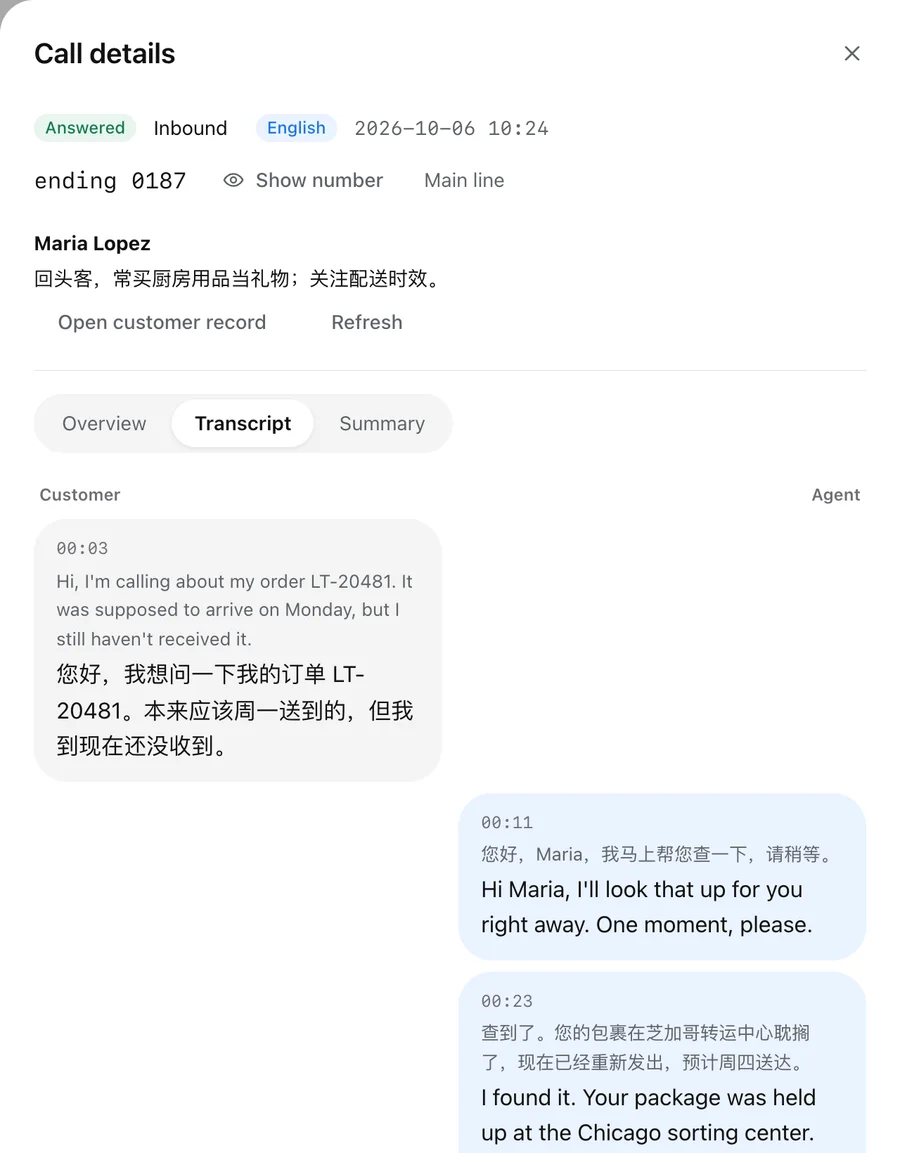
- The agent speaks in their own language; the customer hears the translation.
- The customer replies; the agent hears and reads the translation.
- Both sides appear as live subtitles, original and translation, on the agent’s screen.
- After the call, an AI summary and full transcript are saved.
A step-by-step rollout
1. Pick the language pair and the team
Start with the language most of your non-native callers speak and the team that gets most of those calls. Confirm the pair with your provider first: AI Call Business supports one agent language and one customer language per team and confirms other pairs on request.
2. Add a glossary
List product names, brand terms and abbreviations so they are translated the same way on every call. This removes most of the awkward moments in early calls.
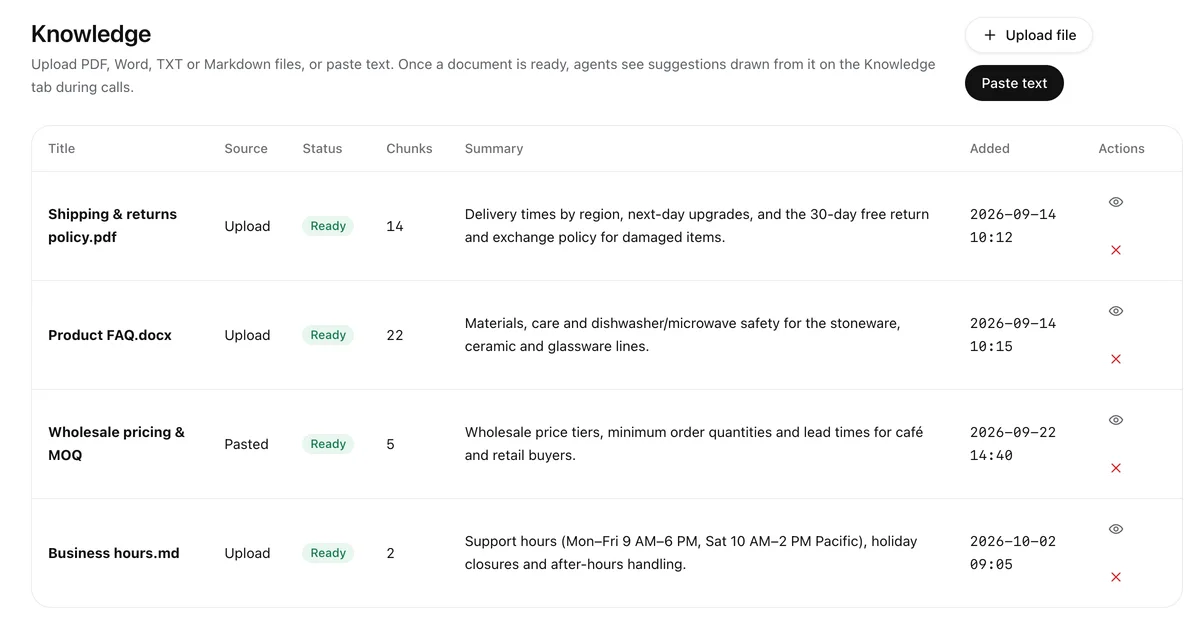
3. Upload your knowledge
FAQs, policies and price lists let agents see suggested answers during the call, and let the AI receptionist answer correctly when nobody is available.
4. Route calls
Use an IVR menu so callers can choose a department or language, ring groups to reach the right agents, and a queue for busy times. Set business hours and an after-hours message.
5. Cover missed calls with an AI receptionist
Switch on an AI receptionist for after hours and for callers who wait too long. It speaks the caller’s language, answers from your documents and takes a message your team reads in theirs. It handles incoming calls only; your team does the follow-up.
6. Measure and adjust
Track calls handled, translated minutes, calls the AI answered and callbacks needed. Review a sample of transcripts each week and add terms to the glossary.
When you still need a human interpreter
Use a qualified human interpreter when law, policy, consent or safety requires one: legal and court matters, medical consent, or any certified interpreting. Treat AI translation as the tool for everyday business calls such as support, sales and logistics.
What it costs
With AI Call Business, seats are $39 per seat per month billed annually ($49 monthly), each with 100 translated minutes a month shared by the team; further minutes are $0.20, about $12 per hour of conversation, with US and Canada calling included. A three-person team using 600 translated minutes a month pays $177 before taxes.
Bottom line
Multilingual phone support no longer depends on who you can hire. Put translation inside the call, ground answers in your own documents, cover missed calls with an AI receptionist, and keep human interpreters for the cases that require them.
👉 Try AI Call Business free: 30 minutes of translated calls, no card.
Frequently asked questions
How do you support customers in a language your team doesn’t speak?
Use live two-way call translation inside the call. The agent speaks their language, the customer hears theirs, and the agent reads both sides as subtitles. AI Call Business does this in a browser call center with no app for the caller.
Is live call translation accurate enough for customer support?
For routine support, sales and logistics calls it works well, especially with a company glossary for product names and terms. For certified legal, medical or court interpretation, use a licensed human interpreter.
Which languages can a multilingual call center support?
It depends on the product. AI Call Business is built for one agent language and one customer language per team, such as Chinese-speaking agents with English-speaking callers in the US; other pairs are confirmed per team.
What does it cost compared with interpreters?
Phone interpreters typically cost around $1–5 per minute. With AI Call Business, seats are $39 per month billed annually with 100 translated minutes each, then $0.20 per translated minute.
Try AI Call for free
Call anyone in any language. Your first translated call is free (up to 2 min).
