Table of contents
Looking for an AI call center for a team whose customers speak another language? AI Call Business is a browser call center with live two-way call translation, an AI receptionist and AI call summaries. Free trial, no card.
Quick answer
An AI call center is call center software with AI working inside each call, not just in the reports afterward. The useful features today are:
- Live call translation, so an agent and a caller who speak different languages can talk normally.
- An AI receptionist (an inbound AI voice agent) that answers when nobody on the team can, and takes a message.
- AI summaries and transcripts written automatically after every call.
- Suggested answers for agents, drawn from the company’s own documents.
It still runs on ordinary phone numbers: customers dial as usual, and agents usually work in a browser.
How an AI call center differs from a traditional one
| Traditional call center | AI call center | |
|---|---|---|
| Language | Agents must speak the caller’s language | Live translation lets agents use their own |
| After hours | Voicemail or a missed call | An AI receptionist answers and takes a message |
| Notes | Agents type them after the call | AI writes a summary and transcript |
| Answers | Agents search a wiki or ask a colleague | Suggested answers from your documents appear during the call |
| Setup | Desk phones, PBX, installed software | A browser, a headset and a phone number |
The routing basics are the same: phone numbers, an IVR menu, ring groups, queues and business hours. What changes is how much of the conversation the software can help with.
The features that matter
1. Live two-way call translation
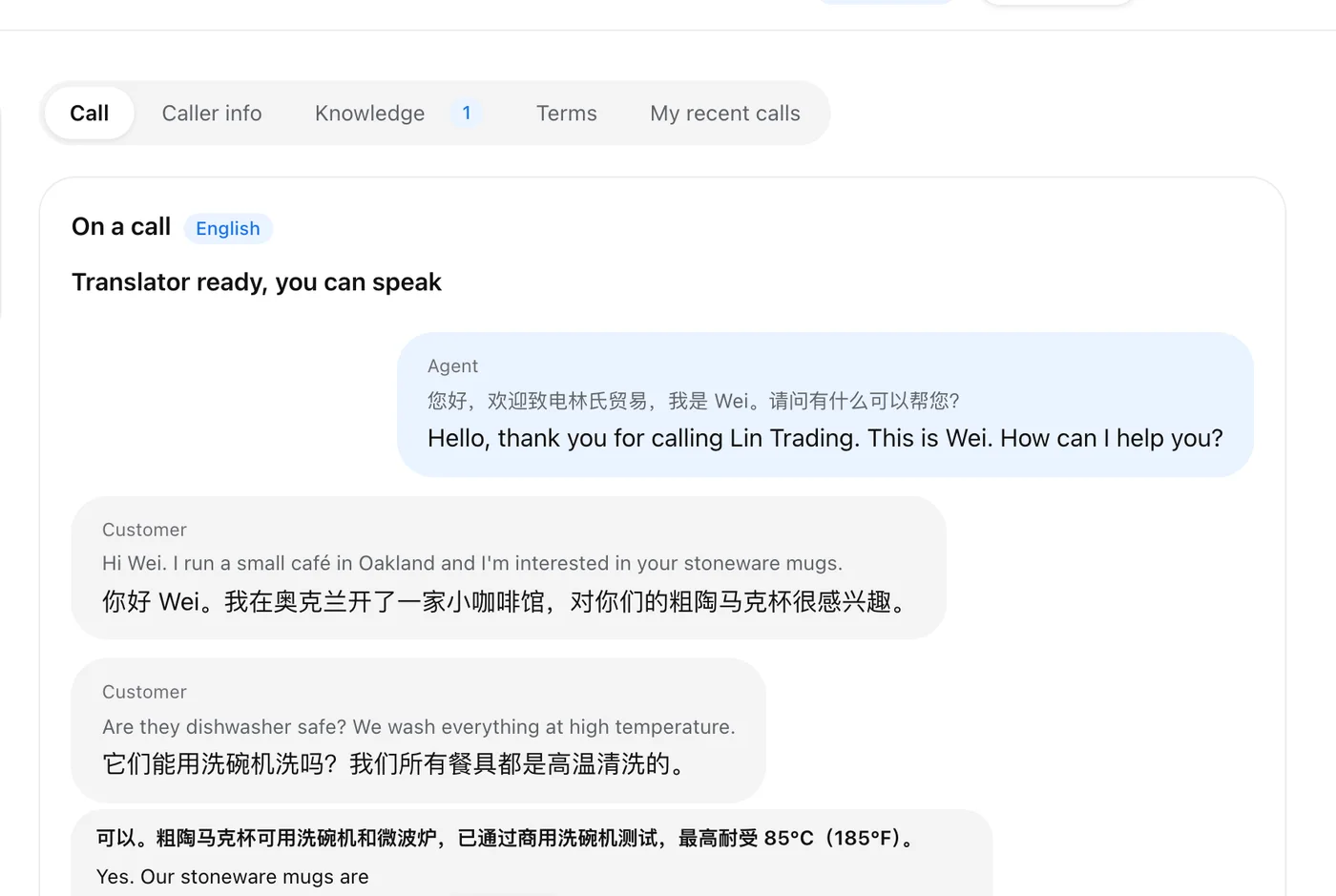
For teams whose customers speak another language, this is the biggest change. The agent speaks their own language, the caller hears theirs, and both sides appear on the agent’s screen as live subtitles, original and translation. The caller needs nothing but a phone.
Good implementations also let you add a company glossary, so product names and terms are translated the same way every time, and play a short disclosure so callers know the call is translated.
2. An AI receptionist for missed calls
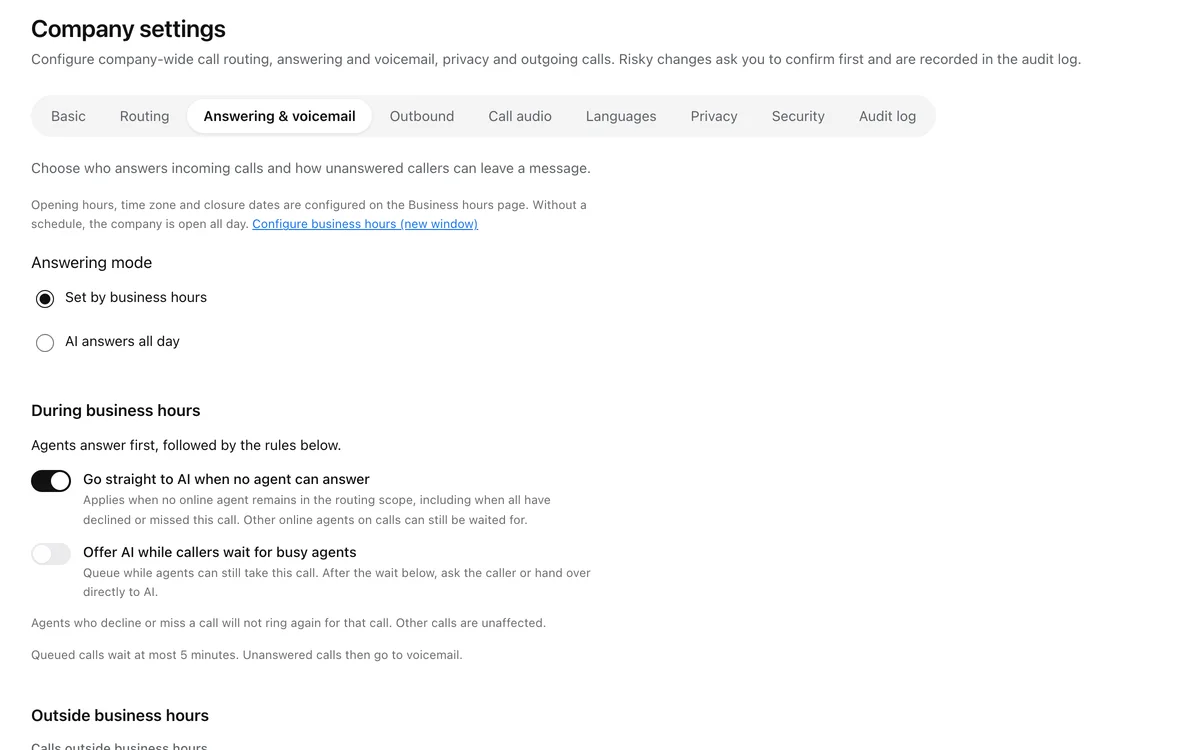
An AI receptionist is an AI voice agent on your business line. You decide when it picks up: after hours, when no agent is online, or when a caller has waited too long. It should answer from your own information, take a complete message (name, callback number, reason) and hand the caller to a person when one is available.
Be precise about its job. In AI Call Business the AI receptionist handles incoming calls only: it doesn’t place outbound calls, book appointments or update other systems. It says up front that it is an AI.
3. A knowledge base the AI can use
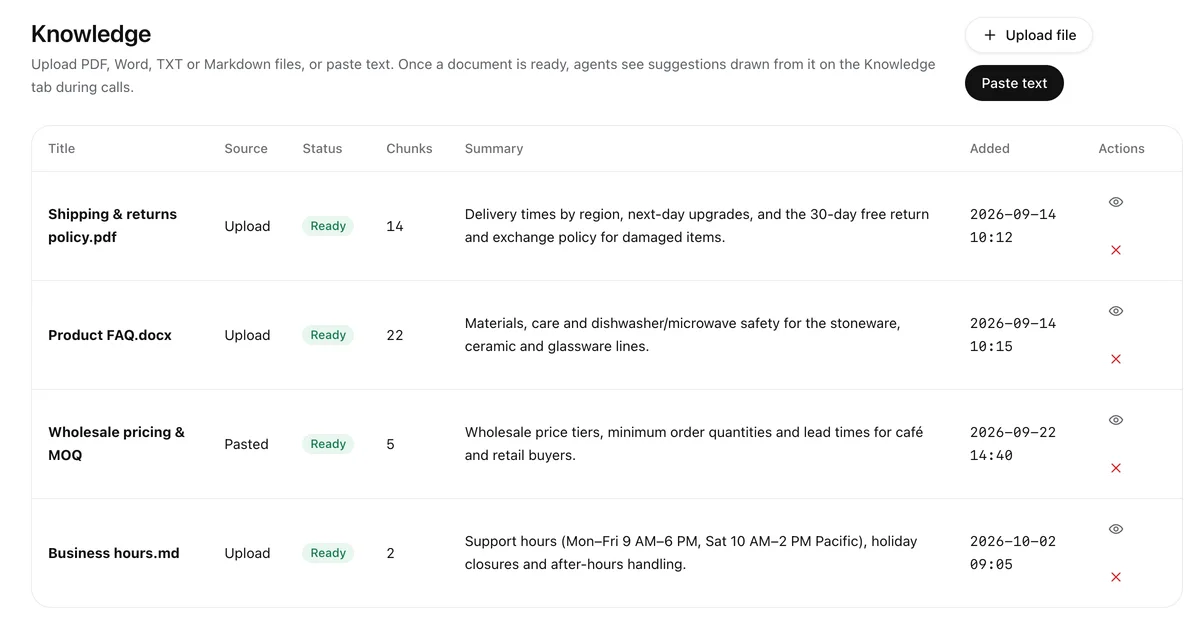
Upload FAQs, price lists and product documents once. The AI receptionist answers from them, and agents see suggested answers on screen during live calls. This is what keeps AI answers grounded in your business instead of guesses.
4. Summaries, transcripts and translated voicemail
Every call ends with a short summary of what the caller wanted and what was promised, next to the full transcript. Voicemails are transcribed and translated, so anyone on the team can act on them.
5. Reports and a live view
Admins should see every call, the minutes used and how many calls the AI handled, plus who is on a call right now.
What does an AI call center cost?
Most AI call centers price per seat plus usage. As a concrete example, AI Call Business pricing is:
| Item | Price |
|---|---|
| Seat | $39 per seat per month billed annually ($49 monthly) |
| Included | 100 translated minutes per seat per month, shared by the team, and one local number |
| Extra translated minutes | $0.20 per minute, US and Canada calling included |
| AI receptionist | $0.15 per minute it answers, or $69 a month for 500 minutes |
| Free trial | 30 minutes or 14 days, no card |
Compare that with the alternatives for multilingual calls: hiring bilingual agents, or paying a phone interpreter, which typically costs around $1–5 per minute depending on provider and language (see AI vs human phone interpreters).
What AI can’t do (yet)
- Certified interpretation. For legal, medical-consent or court settings, use a licensed human interpreter.
- Judgment calls. Refunds, exceptions and complaints still need a person; the AI should take a message or transfer.
- Everything at once. Check which language pairs a product supports for your team rather than assuming every language works equally well. AI Call Business confirms language pairs per team.
How to choose an AI call center
- Start from your callers. Which languages do they speak, and which does your team speak?
- Check the AI’s limits in writing. What exactly does the AI receptionist do and not do?
- Ask how answers are grounded. It should answer from your documents, not make things up.
- Look at the full price. Seats, included minutes, per-minute rates, numbers and add-ons.
- Try it with real calls. A free trial with your own team beats any demo.
Bottom line
An AI call center keeps everything a phone team relies on (numbers, menus, queues) and adds AI where it saves the most: translating calls so agents can serve customers in a language they don’t speak, answering when nobody can, and writing the notes. Start with a trial and real calls.
👉 Try AI Call Business free: 30 minutes of translated calls, no card.
Frequently asked questions
What is an AI call center?
An AI call center is call center software with AI built into the calls themselves: for example live translation between agent and caller, an AI receptionist that answers when nobody can, automatic call summaries and transcripts, and suggested answers for agents during the call.
Does an AI call center replace human agents?
No. Today it works best alongside people: AI answers or takes messages when the team is unavailable, translates so agents can serve callers in another language, and writes the notes. People still handle decisions, exceptions and anything sensitive.
How much does an AI call center cost?
Pricing is usually per seat plus usage. For example, AI Call Business is $39 per seat per month billed annually with 100 translated minutes per seat included, then $0.20 per translated minute; its AI receptionist is $0.15 per minute it answers.
Do customers need to install anything?
Not with a phone-based AI call center. Customers call a normal phone number; agents work in a browser console.
Can a small business use an AI call center?
Yes. Browser-based AI call centers need no desk phones or hardware, so a team of one or two can start on a free trial and add menus, queues and an AI receptionist later.
Try AI Call for free
Call anyone in any language. Your first translated call is free (up to 2 min).
